
Keyboard from Android 2.31.0.15.2 - Google Play
You'll be able to see results in few seconds.
Publisher Description
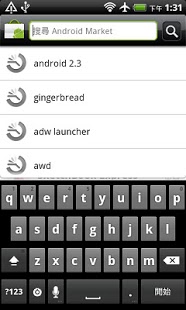
#How to use this keyboard:
1. Enable it in the "Settings / Language & keyboard / Gingerbread Keyboard"
2. Find a text input (mail app or message app), long press the text view.
3. When the popup comes up, select "Input method" and choose gingerbread keyboard.
#For those who worried about collecting data warning.
The warning message is a part of the Android operating system that appears when any third party keyboard is enabled. so don’t worry about it!
#For Galaxy S / Tab Users, Vibration (HapticFeedback) = "Vibrate on keypress" enabled and "Custom vibration intensity" set to "Normal" (In keyboard settings and advanced setting).
# For Czech / Danish / Dutch / French / German / Italian / Norwegian Bokmål / Polish / Russian / Spanish / Swedish users, you need to download the optional dictionaries.
# How to install optional dictionaries: Go to "Gingerbread Keyboard Settings" / "Input languages", select (re-select) the language you want.
# This is a free app, if you do like this app, please buy "Keyboard from Android 2.3 +" to support my work.
you can find my paid version by scrolling down to bottom and click "View more applications" to buy my app, thanks!
Features:
1. Multitouch keyboard
2. User dictionary, built-in dictionary
3. Auto correction
4. Redesigned and optimized keyboard layout and style
5. Speech to text
6. Split main keyboard app and dictionaries.
Features that are available on paid version.
1. 6 Keyboard themes
2. Custom vibrator intensity
3. Custom key height, text size, row gap, bottom adjustment.
4. Long press "Enter" key to bring up smiley alternatives.
5. Options to hide period and comma key.
And I opensourced this project. If you like to help, here is the way to go
https://github.com/g1011999/Gingerbread-Keyboard
Special thanks to Zorxd from XDA for fr-rCH language support!
About Keyboard from Android 2.3
The company that develops Keyboard from Android 2.3 is Steven Lin. The latest version released by its developer is 1.0.15.2.
To install Keyboard from Android 2.3 on your Android device, just click the green Continue To App button above to start the installation process. The app is listed on our website since 2011-04-24 and was downloaded 0 times. We have already checked if the download link is safe, however for your own protection we recommend that you scan the downloaded app with your antivirus. Your antivirus may detect the Keyboard from Android 2.3 as malware as malware if the download link to com.moo.android.inputmethod.latin.free is broken.
How to install Keyboard from Android 2.3 on your Android device:
- Click on the Continue To App button on our website. This will redirect you to Google Play.
- Once the Keyboard from Android 2.3 is shown in the Google Play listing of your Android device, you can start its download and installation. Tap on the Install button located below the search bar and to the right of the app icon.
- A pop-up window with the permissions required by Keyboard from Android 2.3 will be shown. Click on Accept to continue the process.
- Keyboard from Android 2.3 will be downloaded onto your device, displaying a progress. Once the download completes, the installation will start and you'll get a notification after the installation is finished.
Program Details
System requirements
Download information
Pricing
Version History
version 1.0.15.2
posted on 2011-04-24
version 1.0.15.2
posted on 2011-04-24
Several fixes and updates
Disclaimer
Official Google Play Link
We do not host Keyboard from Android 2.3 on our servers. We did not scan it for viruses, adware, spyware or other type of malware. This app is hosted by Google and passed their terms and conditions to be listed there. We recommend caution when installing it.
The Google Play link for Keyboard from Android 2.3 is provided to you by apps112.com without any warranties, representations or guarantees of any kind, so access it at your own risk.
If you have questions regarding this particular app contact the publisher directly. For questions about the functionalities of apps112.com contact us.
